Leody: A Playful Script Font for Modern Web Design
When building a digital product, the choice of typography is rarely just about aesthetics; it is about communication. As a web designer, I spend countless hours balancing visual hierarchy, load speeds, and user experience. In this landscape, finding a typeface that strikes the right balance between personality and usability can be challenging. This is where Leody enters the conversation. It is not merely a decorative element but a strategic tool for designers who want to inject warmth, creativity, and modern flair into their layouts without sacrificing professional polish.
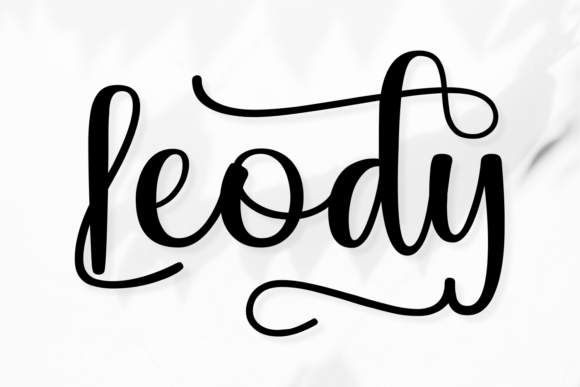
Leody is a stylish script font characterized by its playful swashes and modern curves. Unlike traditional handwritten fonts that can sometimes feel messy or difficult to read on screens, Leody offers casual yet expressive strokes that are carefully crafted for clarity. Its design language speaks to contemporary brands looking to stand out in crowded digital spaces, from social media graphics to high-conversion landing pages. For UI designers and creative entrepreneurs, understanding how to integrate such a dynamic typeface is key to creating memorable brand experiences.
Visual Personality and Digital Appeal
The core strength of Leody lies in its ability to convey emotion instantly. The font’s playful swashes add a touch of elegance and whimsy, while the modern curves ensure it feels current rather than retro. This combination makes it an excellent choice for brands that want to appear approachable yet sophisticated. Whether you are designing for a boutique online store, a coaching website, or a creative portfolio, Leody helps establish a tone that is both friendly and authoritative.
In the context of modern typography, scripts often struggle with legibility, especially at smaller sizes or on mobile devices. Leody mitigates this by maintaining clear letterforms even within its stylized structure. The consistent rhythm of its strokes ensures that text does not feel chaotic. This stability is crucial for web design, where users scan content quickly. A font that guides the eye smoothly contributes to better readability and keeps visitors engaged longer. When used correctly, Leody enhances the visual hierarchy, drawing attention to key messages without overwhelming the layout.
Strategic Applications in Web Layouts
One of the most common mistakes designers make with display fonts is overusing them. While Leody is versatile, it performs best when reserved for specific areas of a webpage where impact is paramount. It is ideally suited for hero sections, where large headline text needs to capture immediate interest. Imagine a landing page for a creative agency or a new product launch; placing Leody as the main headline creates an instant emotional connection with the visitor.
- Hero Sections: Use Leody for large, bold headlines to set the mood. Ensure there is ample negative space around the text so the swashes do not clash with other elements.
- Call-to-Action (CTA) Areas: While body copy should remain neutral, short phrases within buttons or banners can benefit from Leody’s energetic vibe. It can make a "Shop Now" or "Learn More" prompt feel more inviting.
- Blog Graphics and Social Media: For digital ads and social media posts, Leody stands out against plain backgrounds. Its unique shape helps stop the scroll, increasing click-through rates for content marketing campaigns.
- Course Sales Pages: In educational contexts, a serious tone might alienate potential students. Leody adds a human touch, suggesting that the learning experience will be engaging and accessible.
However, caution is advised when using Leody for long-form content. It is not designed for body copy or technical documentation. Instead, treat it as a display font—a creative font that serves as a focal point. Using it for paragraphs can fatigue the reader’s eyes and reduce comprehension. By limiting its use to titles, subtitles, and short phrases, you preserve its special character and maintain a clean, professional interface.
Readability and Responsive Design Considerations
Digital design requires a keen awareness of how fonts render across different devices. Mobile screens, in particular, pose challenges for decorative typefaces due to limited width and resolution. When implementing Leody in responsive layouts, test it thoroughly on various screen sizes. On smaller devices, you may need to adjust the font size or line height to ensure the swashes do not overlap or become pixelated.
Contrast is another critical factor. Leody works beautifully on light backgrounds, where its dark strokes provide strong visibility. On dark backgrounds, ensure the color contrast meets accessibility standards (WCAG guidelines). If placing Leody over image overlays, use semi-transparent containers or drop shadows to separate the text from the background. This technique preserves readability while allowing the font’s personality to shine through complex visuals.
For buttons and small interactive elements, simplicity is key. If you choose to use Leody in these areas, keep the text short and avoid intricate details that might get lost at tiny sizes. Often, a simpler sans serif font is better for functional UI components, leaving Leody for branding elements like logos or section headers.
Font Pairing for Cohesive Brand Identity
To maximize the effectiveness of Leody, pair it with a complementary typeface. Since Leody is a script font with distinct personality, it pairs well with clean, neutral typefaces that provide stability. A simple sans serif font is the most logical choice for body text. Fonts like Inter, Roboto, or Open Sans offer excellent readability and create a balanced contrast with the flowing lines of Leody.
Alternatively, for a more editorial digital identity, consider pairing Leody with a classic serif font. This combination can evoke a sense of tradition mixed with modernity, suitable for lifestyle blogs or luxury brand websites. The key is to let one font lead and the other support. If Leody is the star, the supporting font should recede visually, ensuring that the overall composition remains harmonious.
When selecting a pair, consider the weights available in your chosen sans serif or serif family. Having access to multiple weights allows you to create depth and hierarchy within your content sections. For example, use a bold weight of the sans serif for subheadings to anchor the lighter, decorative nature of Leody headlines.
Licensing and Practical Implementation
Before integrating Leody into your projects, always review the licensing terms. Most premium fonts require specific licenses for different use cases. For instance, embedding a font in a website via CSS (@font-face) may require a webfont license, while using it in static images for social media might fall under a desktop license. Understanding these distinctions is vital for client projects, online stores, and digital templates to avoid legal issues.
Check the file formats included with your purchase. TrueType (.ttf), OpenType (.otf), and Web Open Font Format (.woff2) are standard for web implementation. Ensure that the font supports the character sets you need, including multilingual support if your audience is global. Additionally, look for alternate characters or ligatures that might enhance the design, such as custom swashes or punctuation marks that fit the playful theme.
Ultimately, Leody is more than just a premium font; it is a design asset that can elevate your brand’s visual voice. By using it strategically in headers, banners, and key messaging areas, you can create web experiences that are not only beautiful but also effective. Remember that good design is about solving problems, and typography is one of the most powerful tools at your disposal. With careful planning and thoughtful application, Leody can help you build a consistent online identity that resonates with your audience and drives engagement.